ABOUT RADIOSHACK CHAMION 2150 VERSION I MODEL 60-2204A ELECTRONIC CHESS COMPUTER

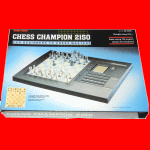
RADIOSHACK CHAMPION 2150 VERSION II Electronic Chess Computer - picture taken from box.
Your RADIO SHACK CHESS CHAMPION 2150 is an advanced chess computer endorsed by world chess champion Garry Kasparov. and even though it has power and features that can challenge chess masters, it also offers levels of play for a chess novice. (There are a total of 64 different levels of play).
The CHESS CHAMPION 2150 automatically registers the moves you make in its memory and on its built-in LCD chessboard display. The display also provides a variety of other helpful information during play.

RADIOSHACK CHAMPION 2150 VERSION II Electronic Chess Computer - picture taken from box.
The CHESS CHAMPION 2150 lets you take back any number of moves or replay entire games which can be extremely helpful in studying and learning more about the game. You can store up to 383 games or special piece positions in the library memory.
If you want to play chess with a friend, you can have the CHESS CHAMPION 2150 referee the game to be sure all the moves are legal. You can even ask the computer for advice during a two-person game.
Finally, you can use the LCD display to see the computer's thought process when it is playing a game with you. For example, you can see what move the computer plans to make next and what the computer expects you to do after that.
MAIN RADIOSHACK CHAMPION 2150 VERSION II CHESS MODEL 60-2204A GAME CHARACTERISTICS
- Professional-class computer chess game has the capability to defeat 98% of all chess players worldwide.
- Player positions can be marked at any time so you can explore various game strategies.
- Express take-back reverts player to previous position in the even of a mistaken move.
- Dot-matrix shows times, depth of search, levels and position.
- LCD screen shows the game in progress and the moves the computer is considering.
- Automatic Transposition Manager and Programmable Library for extensive openings knowledge.
- Stores your unfinished games in memory for future play.
- Remembers saved positions.
- Main sensor board tracks your moves and board positions.
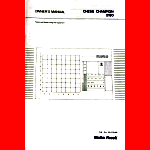
Excerpts taken from the RADIOSHACK CHAMPION 2150 VERSION II user manual and box.
SO WHAT ARE THE DIFFERENCES BETWEEN MODEL 60-2204 AND 60-2204A?
Below are some differences as shown in the respective User Manuals:
MODEL 60-2204
MODEL 60-2204A
1. USING THE CHESS CLOCKS
|
In a normal, two clocks appear at the bottom of the display. They keep track of the total time each side uses in the game. Initially, minutes and seconds are displayed. After 60 minutes the display changes to hours and minutes (with a flashing colon). |
In a normal, two clocks appear at the bottom of the display. They keep track of the total time each side uses in the game. Initially, minutes and seconds are displayed. After 10 hours, the display changes to hours and minutes (with a H on the leftmost digit). |
2. SETTING LEVELS OF PLAY
|
The chess computer has a total of 64 different play levels. They include levels for casual play, tournaments, speed chess, game analysis, problem solving, and eight special novice levels for beginners. The levels are identified by the row (1-8) and column (A-H) indicators on the board. When you initialize the computer, level A1 is automatically selected. You can verify this by pressing [LEVEL]. The MODE indicator flashes orange, indicating the computer is in the level mode, and the row/column indicators point to square A1. Also LE 1 00:01 appears on the display. |
The chess computer has a total of 64 different play levels. They include levels for casual play, tournaments, speed chess, game analysis, problem solving, and eight special novice levels for beginners. The levels are identified by the row (1-8) and column (A-H) indicators on the board. When you initialize the computer, level A3 is automatically selected. You can verify this by pressing [LEVEL]. The MODE indicator flashes orange, indicating the computer is in the level mode, and the row/column indicators point to square A3. Also 0:05/1 L appears on the display. The highlighted L indicated the computer is in the level mode. |
EXAMPLE PLAY LEVEL DISPLAY DIFFERENCES
EXAMPLE PLAY LEVEL DISPLAY DIFFERENCES
|
Level |
Average time per move |
Display |
Level |
Average time per move |
Display |
|
A5 (casual) |
30 seconds |
LE1 00:30 |
A5 (casual) |
30 seconds |
0:30/1 L |
|
A8 (casual) |
3 minutes |
LE1 03:00 |
A8 (casual) |
3 minutes |
3:00/1 L |
|
B2 (tourn) |
40 moves/2 hours plus 20/1 hour |
LE40 v 02:00 |
B2 (tourn) |
40 moves/2 hours plus 20/1 hour |
2:00/40 L 1:00/20 |
3. SELF-PLAY MODE
|
N/A |
There is a way to make the computer automatically play an entire game against itself - you don't have to press a key for each move. Press [FUNCTION] [PLAY] [PLAY] and the computer automatically makes moves for both sides and displays the moves on the display. You don't have to move the playing pieces. If you want to interrupt the computer's play and make moves manually, press [ANALYSIS] [NORMAL]. If you do this however you should set up the pieces as shown in the display. |
4. THE MAIN VARIATION AND POSITION EVALUATION
|
The main variation is the next series of moves the computer thinks is best. If you want to see what those moves are, press [INFO] while the computer is thinking. Then, using the row/column indicators, the computer shows you its next move (the FROM square is indicated for two seconds and the TO square for one second). After that the computer indicates the move it expects you to make and what move it intends to play after that. After showing you the main variation, the computer turns on one row indicator (on the left side of the board) to indicate what it thinks the outcome of the game will be based on the current piece positions:
|
The main variation is the next series of moves the computer thinks is best. If you want to see what those moves are, press [INFO] twice while the computer is thinking. Then, using the LCD chessboard, the computer shows you its next move (the FROM square and the TO square flash alternatively for three times). After that the computer indicates the move it expects you to make and what move it intends to play after that. At the end of the main variation the computer displays the depth and the evaluation. The evaluation display is in 100ths of a pawn (e.g. “2:00” means that it thinks that White is the equivalent of two pawns ahead). A minus sign in front of the value means that Black is leading.
|
The above examples from their user manuals clearly show that there is a difference in the display functionality. Model 60-2204A seems to have an improved evaluation. The above are some examples. There are a few additional differences shown in the respective User Manuals.


Technical Specification
RadioShack Champion 2150 Version II (1989)

Box
Computer Label
User Manual
Spacious Mind
Schachcomputer.Info
Active 2017
Tourn. 2015
1834
-
T1
T2
T3
T4
T5
Final
-
-
-
-
-
-
MANUFACTURER
PROGRAMMER
RadioShack/Tandy Corporation
Julio Kaplan
2150 USCF
1989
$199,00
1750 SSDF
Year:
MFR ELO:
Original Price:
Wiki ELO:
Model #:
60-2204A
My Serial #:
Not Available
Processor OEM
MOS Tech.
Processor:
6502
Speed:
Type:
8 Bit
3 MHz
ROM:
64 KB
RAM:
8 KB
Battery Type:
6 x “C” Cell
Power Adapter:
9V D/C 300 mA
Display:
LCD Dot Matrix
Board Type:
Press Sensory
Overall Size:
Board Size:
8x8 in
16.1/2x11x1.1/4
Options Select:
Button Select
Play Levels:
64
Opening Book:
100K Half Moves
Take Back:
50 Half Moves
Position Setup:
Available
Position Verify:
Available
Move Analysis:
Display Info:
Available
Available
Solve Mate:
Mate in 8
Save Game:
Available
Ponder:
Available
Search Depth:
20 Ply Max.
Provide Hint:
Available
Teach Mode:
Not Available
Change Sides:
Available
Active Level:
TM Level:
B2
Infinite Level:
B7
A5
Game Features
Matchplay & Test ELO Ratings
Computer Game Rating
Rating Test
Other Computer Chess Ratings
USCF
USCF
Spacious Mind
Human Rating
USCF
CCR 94
CCNS 94
Ply 94
FIDE
USCF
1973
1931
1960
1890
1916
Class A Level Electronic Table Top Chess Computer!
Hardware Specification