FIDELITY ELITE AVANT GARDE MOBILE MASTER ELECTRONIC CHESS COMPUTER
WELCOME TO THE FIDELITY CHESS CLUB.
Congratulations on the purchase of your new ELITE AVANT GARDE, the world's strongest commercially available Chess Computer.
There are many Elite Avant Garde versions that followed the Mobile Master. However the first Elite Avant Garde was named the Mobile Master as it contains the Elite XC program that won the 1985 American Open Computer Chess Championship which was held in Mobile, Alabama. As a result of this success this computer was named the Mobile Master.

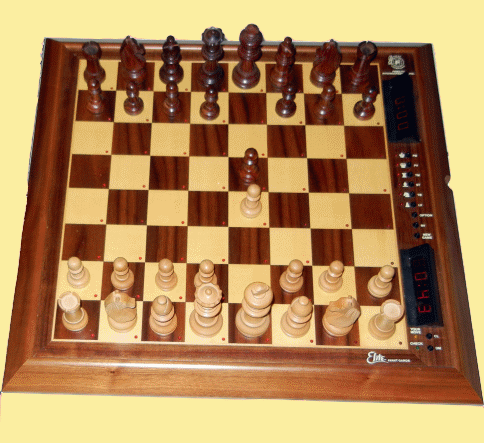
FIDELITY ELITE AVANT GARDE MOBILE MASTER - Picture taken from user manual.
MAIN FIDELITY ELITE AVANT GARDE MOBILE MASTER GAME CHARACTERISTICS
DISPLAY WINDOWS: The displays have many extensive and varied functions. They supplement and improve the computer's communication abilities. They confirm each step you take, and greatly simplify the operation of the ELITE AVANT GARDE MOBILE MASTER. The displays show you the depth of search and positional score, the amount of time that has been used and how much time remains. They tell you when either side has taken too much time, when you have made an illegal move, they display mates, and recommend when you should change modules. The entry of time control values, time handicaps, and depth of search are also confirmed via the display.
LEVELS OF PLAY: The playing strength of a chess program primarily depends upon how far the computer can look ahead within the time allotted. The longer the computer is allowed to think, the higher its playing strength will be. The ELITE AVANT GARDE MOBILE MASTER offers you an infinite number of playing levels with all possible options for selecting and setting time limits for individual moves or for a number of moves. This flexibility enables you to control the computer's playing strength.
Preset Levels: For your convenience, Fidelity has preset time controls for levels A1 through A8 which cannot be altered. The response times are not strictly adhered to by the ELITE AVANT GARDE MOBILE MASTER. As a rule however the computer will hold itself to those times, and will usually not use up all the time which it has available. The average response time for each individual move can be computed from the time limits. Depending on the complexity and the nature of the position, the actual thinking time can deviate considerably from the average time. for example, the computer will use very little time when its King is in check and it only has one legal move. On the other hand, the computer might use more time when it is on the defensive or when the program sees a possible mate and wants to make the best move. If time is saved on a move, the thinking time which has not been used is distributed equally among the rest of the moves; when more time is taken for a move, the excess time taken is subtracted from the average times taken for the rest of the moves. The thinking time is then recalculated for each move that follows. Functions such as take-backs and changing sides have no effect on the time limits.
Programmable Playing Levels:
- Level B1 (Analysis/No Time Limit): This level has not time limit. Due to the computer’s memory capacity, however, the search depth had to be limited to 30 half-moves.
- Level B2 (Blitz or Speed Chess from 1 minute to 9 hours 99 minutes per game): Playing level B2 provides you with another tournament level. On this level, a total time limit is set for the game, without taking into consideration the number of moves which will be made. This type of setting is mainly used for blitz or speed chess games. In tournament chess today, the following time limits are customary:
- Blitz Chess: 5-10 minutes per game.
- Speed Chess: 20-45 minutes per game.
- Level B3 (Tournament Chess from 1 minute to 9 hours 99 minutes total thinking time for 1-99 moves): This level is provided for serious tournament chess. As in actual tournament, each player must make a certain number of moves within a set time period, in accordance with tournament rules. These two factors - number of moves and time controls - must be set in advance. This level employs a countdown timer - as each move is made on the board, the appropriate clock displays the amount of time remaining for the player.
- Experimental Levels - Iterative Search (B4) and Non-Iterative Search (B5): The problem of finding the best move in a certain board position cannot be described exactly and, therefore, also cannot be solved according to an exact formula. By means of special mathematical approximations, one can repeatedly find approximate solutions, which can eventually get close to the exact solution. This type of approximation can also be used in chess programs. Such a procedure is known as iterative search (iteration = Latin for repetition). The basis of this procedure is to use moves that have already been calculated as approximate solutions for a new calculation, based on the previous moves, and to repeat this procedure again and again with deeper and deeper search depths. While using the iterative search, in very basic terms, the computer examines the full width (for all possible moves) to a certain ply, identifies the best move, and then goes on to repeat the search at the next ply. The purpose of using this method is to optimize the computer's efficiency within the amount of time it has to think. In fact, all of the ELITE AVANT GARDE MOBILE MASTER'S preset levels use the iterative search method. Using another procedure, the computer identifies a specific move possibility and researches that move up to a set search depth. Once the research for that specific move is completed, the computer identifies another move and researches it to the set search depth - and so on. Since the program does not have to recalculate moves that have already been searched in this case, this procedure is referred as non-iterative search. Your ELITE AVANT GARDE MOBILE MASTER contains these special programs in levels B4 & B5. Because of the characteristics of these playing levels, they have a limited playing strength if they are used for normal games, i.e., games with fairly short thinking times. For correspondingly high thinking times, these levels become very interesting and valuable experimental and analysis programs.
- Mate Solving Levels B6: For the mate solving level, a special program is activated which only searches for mates. The computer can solve mate problems up to mate-in-15.
OPTIONAL PRINTER: Fidelity's Impact Printer can be connected to the computer.
HUMAN PLAYING BLACK FROM THE BOTTOM: You can set the computer to play as White from the top of the chess board if you wish.
BRAIN OFF: Before starting a game, you can activate E8 to invoke this special feature. Once activated, the computer no longer has the ability to think on your time. It will only start its move evaluation after you have made your move on the board. Each playing level can be weakened by using E8, thereby giving you the option of having more skill levels to choose from. You may activate or deactivate this option at any time during a game.
BOOK PRACTICE MODE: For the general opening practice, whether you are using the computer's built-in library of book openings or a book opening cartridge, the computer will dictate the opening to study by making random suggestions. After each computer move, you must try to continue the game by playing the move that you consider strategically best. If you play a move that is contained in the opening library, the computer will determine if a counter move is present. if it finds the counter move, the computer will play it immediately, using none of its thinking time. If there are several moves available as counter moves, the computer will randomly pick one of the moves. If no move is available or if you make a move that is not in the computer's book, the computer will signal the end of the opening variation. It does that by beeping three times or making a voice announcement (if voice option is selected). It also shows the end of the book by keeping the LED of the last TO square lit. If the computer plays the last move of a book opening variation, it will also signal this as described above.
STUDY SPECIFIC OPENINGS: In addition to the general opening study, you can also practice specific opening variations of your choice. To do this, have the computer play your chosen variation up to a certain point. Variations can be specifically chosen by repeatedly pressing the RV Key after the computer has responded with a move BUT BEFORE THE PIECE IS PHYSICALLY MOVED. After each press of the RV Key, all stored counter moves will be shown on the board, one by one. Press RV until you see the desired book move on the board, and then simply make that move. Follow this procedure alternatively for both sides, until you want to continue the opening variation for one side.
TAKE BACK MOVES: By repeatedly pressing the TB Key, you can take back the entire game.
OPENING MOVE SUGGESTIONS: If you are not sure of which move to make, the computer can help you by giving you one or more suggestions. If the DM Key is pressed, the computer will use LEDs to indicate a suggested move on the board. By repeatedly pressing DM Key, it will show you all stored counter moves.
MONITOR MODE: If desired, you can turn the game on and use the computer board to play against another human by activating E6 for Monitor Mode. In this mode, the computer will only check the legality of the moves. If an illegal move is made, the computer will announce this. The computer's chess clock can also be used in Monitor Mode (each clock will correspond to the side of the board where it is located).
AUTOMATIC DEPTH, SCORE & TIME: After activating E1, you will see the score display and the search depth on your clock and the computer's move time on its clock.
RESIGN ENABLE: Engaging this feature by pressing E2 causes the computer to resign if it sees a forced mate against itself.
THINKING ON THE OPPONENT'S TIME: A special feature of this program is the brain which enables it to think on its opponent's time. While the computer is making its move, you are able to use that time to analyze the position and think of a counter move to the move the computer might make. Similarly, the computer also thinks ahead while you are deciding which move to make. The computer does this automatically whenever you are thinking about your move. The brain is based on the following principle: While it is thinking about a move, the program will store in memory the anticipated best line of play, up to 9 half-moves. The first half-move the computer looks at is the counter move to the it expects you will make. The next half-move it looks at is the anticipated counter move that you might possibly make. This evaluation serves two functions. It makes up the move suggestion which you might request, and also the move upon which the computer will now base its further calculations. Thus, the computer assumes that you will make this move and immediately starts thinking of the counter move. If you play the expected counter move or take it as a move suggestion, the computer will play its counter move sooner. In this manner, the computer is able to save up thinking time, which can then be divided among the rest if the moves of the level time limit that you set at the beginning of the game. If, however you play a move other than the one anticipated by ELITE AVANT GARDE MOBILE MASTER, the computer will discontinue its first move calculation and start a new one, based on the move you actually made.
MOVE SUGGESTIONS: If you are in a position where you are not sure which move to make, the computer will help you. If you press the DM Key, the computer will suggest a move for you to make by lighting the LEDs in the FROM and TO squares of that move. The computer will not give you a suggestion if it is not using its book opening library and has not had the chance to calculate its previous move.
THE COMPUTER PLAYS ITSELF: Watch the computer play against itself. By doing this, you can study its strategy and tactics, its offense and defense and its opening and endgame. Compare the moves you would have made in certain positions with the moves the computer makes, or study the development of the game from a specific point or from an opening variation.
PROBLEM MODE: You can enter pieces on the board in one of three different ways:
- Entering pieces on a clear board.
- Adding pieces to a certain board position.
- Entering pieces via the Monitor Mode.
POSITION VERIFICATION: After entering pieces, changing pieces, or taking back moves, you should always use Position Verification to make sure that you have set up the board correctly. To do this press the PV Key.
Excerpts taken from Fidelity Elite Avant Garde Mobile Master user manual.


Technical Specification
Fidelity Elite Avant Garde Mobile Master (1986)


Box
Computer Label
User Manual
Spacious Mind
Schachcomputer.Info
Active 2017
Tourn. 2015
1901
-
T1
T2
T3
T4
T5
Final
-
-
-
-
-
-
MANUFACTURER
PROGRAMMER
Fidelity Electronics, Ltd.
Dan & Kathe Spracklen
2000
1986
$2495.00
1835
Year:
MFR ELO:
Original Price:
Wiki ELO:
Model #:
6081
My Serial #:
60388008
Processor OEM
MOS Tech.
Processor:
6502
Speed:
Type:
8 Bit
5 MHz
ROM:
28 KB
RAM:
16 KB
Battery Type:
Not Available
Power Adapter:
9V DC +/-
Display:
2 LCD + 64 LEDs
Board Type:
Magnet Sensory
Overall Size:
Board Size:
14x14 in
19x18x1.5/8 in
Options Select:
Button Select
Play Levels:
Preset + User
Opening Book:
8160 Half Moves
Take Back:
Complete Game
Position Setup:
Available
Position Verify:
Available
Move Analysis:
Display Info:
Available
Available
Solve Mate:
Mate in 15
Save Game:
Available
Ponder:
Available
Search Depth:
15 ply max.
Provide Hint:
Available
Teach Mode:
Not available
Change Sides:
Available
Active Level:
TM Level:
A6
Infinite Level:
B1
A3
Hardware Specification
Game Features
Matchplay & Test ELO Ratings
Computer Game Rating
Rating Test
Other Computer Chess Ratings
USCF
USCF
Spacious Mind
Human Rating
USCF
CCR 95
CCNS 95
Ply 95
FIDE
USCF
2022
1980
2010
1944
1987
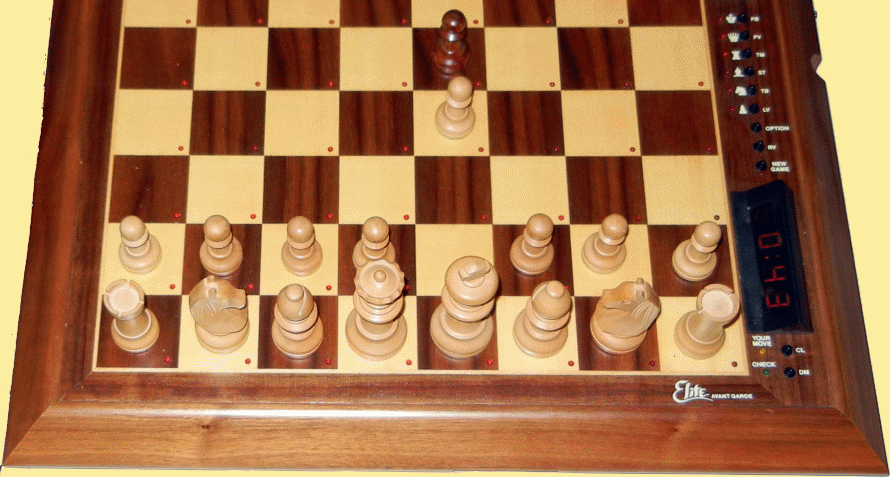
Top View of Fidelity Elite Avant Garde Mobile Master Chess Computer
Class A Level Electronic Table Top Chess Computer!