
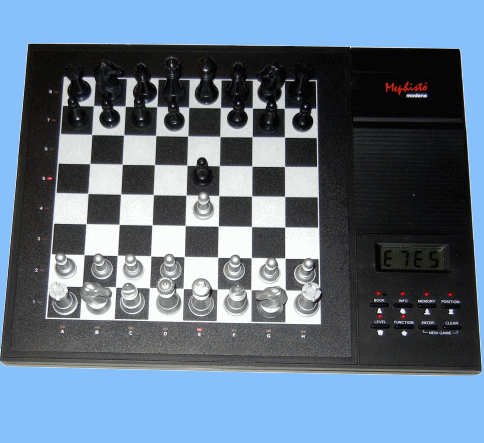
MEPHISTO MODENA Electronic Chess Computer.
Picture taken from Mephisto Modena computer.
Dear Chess Friend!
We would like to welcome you to the growing number of MEPHISTO chess computer owners and we wish you many hours of pleasure with your computer.
MEPHISTO MODENA is a German designed, quality product simple to use, equipped with many functions and is an ideal tournament and training partner for anyone interested in chess.
JUST A FEW MEPHISTO MODENA GAME CHARACTERISTICS:
- The Chess Clock -- The computer automatically shows the clock in the display when it is your turn to move, or when it is analyzing. The chess clock is a so-called "four mode chess clock" i.e. it shows the following two times for itself and for the player:
- Firstly: The total time used.
- Secondly: The time used per move.
- Rules of Chess -- MEPHISTO MODENA knows all the rules of chess, including castling, pawn promotion, en-passant, stalemate, draw by 50-move rule, draw by not enough material and draw by 3-fold repetition.
- Book Mode -- In the Book mode you can make the MODENA show you moves during the opening phase of a game, or you can influence MODENA’s the openings choice.
- Opening Book -- MEPHISTO MODENA's opening book differentiates between active and passive moves. Active opening moves are ones which MODENA will select when it is playing. Passive moves however, are recognized by MODENA so that it can find the answering moves if an opponent plays these, but it will avoid playing them itself as this could lead to positions which the computer's program may not be able to handle so well. Passive moves are indicated by dots between characters and numbers on the display.
- Information Mode -- In this mode you can call up information about the MODEMA's move analysis. Each time you press the INFO key, different information is displayed:
- INFO 1 (Main line, Move hint) -- If MODENA has already left the opening book and started analysis (or is presently thinking) then the main line (of the continuation of play) can be called into the display by pressing the INFO key once. If you call up the main line when it is your turn to move then you can use the first move shown as a move suggestion.
- INFO 2 (Position Evaluation, Analysis Depth, Time per Move) -- If MODENA has already analyzed moves, or is presently thinking, then pressing the INFO key twice will cause the display to show the current position evaluation in pawn units. A minus sign before the value means the computer sees itself at a disadvantage. The value -1.50 therefore means that the computer sees itself at a disadvantage of 1.5 pawns. The ENTER key has also a special function in the INFO 2 Mode. If you press the ENTER key during the position evaluation display then the display switches to show the analysis depth i.e. d 6 - means the computer has analyzed up to a depth of 6 half-moves (or ply).
- INFO 3 (Move Counter) -- If the computer has already analyzed moves, or is presently thinking, then pressing the INFO key three times will show the move counter, i.e. the number of moves already played.
- Memory Mode -- This is used to key in moves and move sequences into MODENA's memory or to read move sequences from MODENA's memory.
- Taking Moves or Move Sequences Back -- MODENA's built-in memory allows you to take back one or all of the moves in a game, while the game is still in session. To do this press the MEMORY key twice when it is your turn to move. The last move played is then displayed with dots between the notation. Take the move back by pressing the target square and the the starting square of the move on the sensory board. As soon as you have pressed the starting square, the display shows the move prior to the one just taken back. You can continue with this until all of the moves are read out of the computer's memory.
Excerpts taken from Mephisto Modena User Manual.

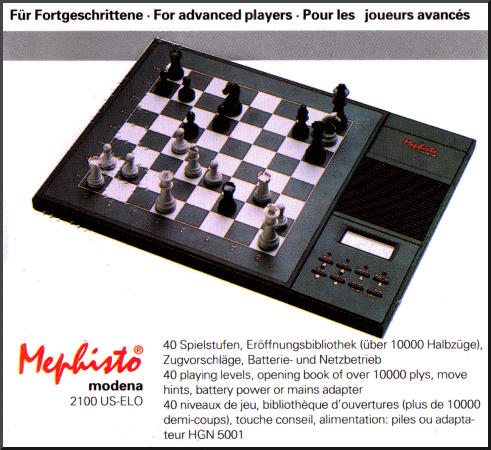
MEPHISTO MODENA 2100 US-ELO FOR ADVANCED PLAYERS.
Picture taken from Mephisto Product Leaflet.
Technical Specification
Mephisto Modena (1992)

Box
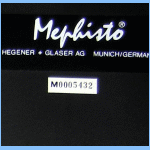
Computer Label
User Manual
Spacious Mind
Schachcomputer.Info
Active
Tournament
1967
1912
T1
T2
T3
T4
T5
Final
-
-
-
-
-
-
MANUFACTURER
PROGRAMMER
Hegerner + Glaser
Frans Morsch
1800 SSDF
1992
$295.00
1897
Year:
MFR ELO:
Original Price:
Wiki ELO:
Model #:
-
My Serial #:
M0005432
Processor OEM
MOS Tech.
Processor:
6502
Speed:
Type:
8 Bit
4.19 MHz
ROM:
32 KB
RAM:
8 KB
Battery Type:
6 x AA
Power Adapter:
9V DC HGN 5001
Display:
LCD 4 Pos 7 Seg
Board Type:
Press Sensory
Overall Size:
Board Size:
7.5/8x7.5/8 in
13.3/8x10x1.3/8
Options Select:
Button Select
Play Levels:
40
Opening Book:
10000 half moves
Take Back:
Complete Game
Position Setup:
Available
Position Verify:
Available
Move Analysis:
Display Info:
Available
6 ply max var.
Solve Mate:
Mate in 8
Save Game:
Available
Ponder:
Available
Search Depth:
22 ply max.
Provide Hint:
Available
Teach Mode:
Not Available
Change Sides:
Available
Active Level:
TM Level:
C5 - 40/2 Hrs.
Infinite Level:
A8
A3 - 30 Seconds
Hardware Specification
Game Features
Matchplay & Test ELO Ratings
Computer Game Rating
Rating Test
Other Computer Chess Ratings
USCF
USCF
Spacious Mind
Human Rating
USCF
CCR 1995
CCNS 1995
Ply 1995
FIDE
USCF
2069
2063
2074
1995
2053
Expert Level Electronic Table Top Chess Computer!